website tracking

Wednesday, 27 July 2016

Bio Med and Functional Skills in the virtual world

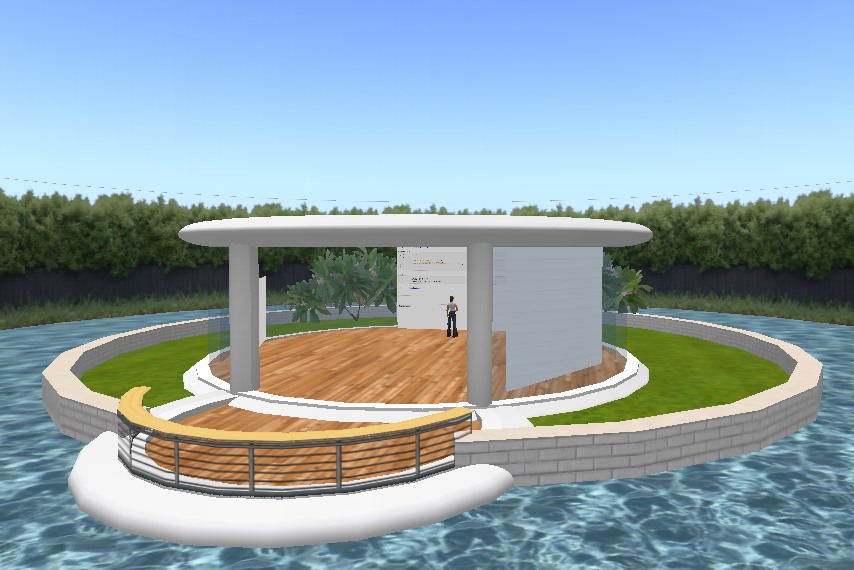
Following my presentation at the College HE day on the use of virtual worlds I have subsequently received two project requests, the first was from our Bio Med team who asked would it be possible to have virtual lab that students could use to become familiar with equipment and use. So first things first I went about setting up a sky platform and installed a build; I actually found this one at OpenSimCity, and after making a few texture changes fig 1.

Fige 1

I met with a couple of team members, where I am pleased to say they agreed and we talked about some details of use and functionality.


The second request came from Functional Skills math’s, and just like with Bio Med, my approach basically was, can we get the virtual world to do something for us that the vle does not, and of course my answer to that is provide a simulated life experience, it really is important I think not to simply reproduce vle or documented content and drop it into a virtual world. And so my plan is to present students and staff with an urban set of life experiences, and as a starting point using a cafĂ© facility where students can order beverages and food, work out their payment and change, then sit down chat and enjoy the virtual ambience see fig 2.

Fig 2


This is the basic setup, and I have used an existing urban style sim that we already have running for this.  I will be getting my head down for some serious building and scripting in the days ahead on both projects, So if you are interested then please stay in touch and as always feel free to comment.

Saturday, 23 July 2016

Crypto Island


Fig 1
If you have read the previous pot then you will no doubt have realised that is referred to the considerable success of the Only Rocket Science project that ran in 2014-15, so did I run any project 2015-16, of course, I just hadn’t got around to blogging. The project for the last academic year was Crypto Island see fig 1; the clue is in the name, and the project was designed as a case study for me to investigate the use of serious games. As a pedagogical tool, the use of games, often popularised as gamification using points scores, badges and leader boards can bring a competitive enthusiasm and engagement to learning. While these interventions may prove effective early on, eventually participants can often come to feel punished or controlled by a system that relies completely on extrinsic rewards. Moving away from the view that a game is a tool used to support learning, and that instead the game is a medium through which one learns, presents the opportunity to consider the more intrinsically rewarding benefits of serious games, in essence that the game should not only be fun but produce emotional, behavioural and cognitive engagement, in a combination that is key to success (Iten., N.  & Petko, D. (2014). Learning with serious games: is fun playing the game a predictor of learning success? British Journal of Educational Technology doi:10.1 1 1 1/bjet.12226).

The sim transported students back to the period 1942 when Britain was at war, see fig 2.
Fig 2


fig 3
Students were tasked with learning about and then cracking encrypted messages. The game element I introduced was for them to decipher the code before damage from nightly air-raids see fig 3 reached a predetermined value. In the event that the target value was exceeded, then the encryption would become correspondingly more difficult.


fig 4
Students start by learning the fundamentals of encryption based situated in an old factory learning space, see fig 4. Where materials are presented on notecard dispenser boards in a low resource demanding format. The emphasis at this phase is for collaborative problem solving, making successive attempts at testing and evaluating their learning using in-world online cryptographic engines. Submission uses notecards that are returned using covert drop points, in this case public letter boxes. Once the practice sessions are complete, actual messages are delivered through telephones placed at various locations around the sim; in order to retrieve message students would have to wait for a telephone call (ring), at which point they simply touch on the telephone to receive a notecard; a particular feature I felt had the further effect of encouraging exploration and collaboration. Once the cyphers have been decoded, they are once again recorded on notecards and returned using the drop point network. When all messages have been correctly deciphered, air strikes will cease, effectively ending the game.


Friday, 15 July 2016

Only Rocket Science

This has been a really good year for virtual world projects. My student project for the academic year 2014-15 level4 and 5 was Rocket Science. The benefits to my students I feel are twofold: first, in using the medium, they acquired the knowledge, understanding and competence to complete the task; second, they experienced the advantages of collaborative, virtual, social, synchronous communication afforded by the visual learning styles of the 3D environment.

 
Fig1

Virtual learning would be presented as a signposted, linear, walk-through workflow series of activities, from Orientation to Simulation, as shown below in Figure 1.
 
The main learning space comprised three tasks that cover Boost, Coast and Recovery phases of the rocket’s flight. The stages are presented as a signposted, linear, walk-through series of activities, carried out using similar workflows that are presented as:  introduction notecard boards, exercise boards, calculator boards and a drop box. Fig 2.
Fig 2
 
The final simulation stage draws the together the work of the previous stages. It presented the students with a full set of flight-profile calculations, dispensed once again from the notecard board. Upon completion, the notecard was saved and a copy dragged to the drop-box. Students could then check their results by launching a rocket: touching the green button at the centre of the launch console table produces a series of drop-down options prompting for input parameters, after which a soundscape introduces the countdown and launches the rocket.  Figure 3.
Fig 3
 
If you are interested in the reading more about this, my research proposal report has been published on the Compass website from the by the University of Greenwich. As an added incentive for me, I was given the Research Award for 2015-16 for research from Bromley College, very encouraging, there is also a YouTube if you would like to take a look, feedback welcome.
The project in fact received even more exposure when I was asked to deliver an impromptu presentation to the JISC ConnectMore16 conference in June.

I have since been receiving requests from within Bromley College for more virtual worlds specifically Functional Skills and Bio Medical science, so please stay in touch for developments.
 
Bye for now Skipper


Monday, 4 August 2014

Virtual World Student Feedback 2013-14


Taking the form of a virtual field trip for a wider project, the students task was to explore the alien world of Bopak3, created using Open Simulator. 

Foundation Degree Yr1
On the planet, Bopak3, a star ship had crash landed randomly scattering Dilithium crystal essential to it propulsion system across the virtual landscape. As crystals were of different types they had to be classified by group and identified using both colour and location. The students were encourage to plan and collaborate for the task in order to optimize the limited time they would be allowed to spend in such a potentially hostile environment.


Foundation Degree Yr2
Each student was required to establish a habitat on the planet were energy production would be made available entirely from the renewable resources of wind, solar light and combustible materials such as alien wood.  
In order to gather the necessary data on wind and solar energy, students would need to visit the location and use data from weather stations combined with their own observation and assumption regarding the day night cycle.
Each student was provided with an individual habitat with its own unique combination of solar energy technologies.

In order to add to the emersive realism each avatar came ready installed with spacesuit, boots, gloves, helmet and backpack life support

If you would like to see the feedback reports then please teleport over to Coders Central in Second Life and download the PDF files.

Monday, 10 December 2012

Free Lounge for Conferencing

Now I actually have my own sim in Second Life where events can be held, facilities  created and builds maintained, I tend to forget that unless you actually have a plot of virtual land, then being able to facilitate such things as even a general conversational type of meeting can be problematic. With this in mind I decided to create the Lounge

You can make use of the Lounge for small meetings and conferences at no charge, though of course any donations are welcome. I did want to provide something though that was a little more than just a virtual space where avatars could meet and chat. At the Lounge you will find shared media access to the Internet, a set of programming tools, if your meeting is along the lines of software design and finally and interactive whiteboard. To accompany the functionality of the place, you will also find some ambient features like bird song and running water. 

Please feel free to teleport over and take advantage of the Lounge and of course pass on any screen shots and comments.

Thursday, 8 November 2012

Free Speaker Buddy

If you teleport over the the main hall at the Coders Central sim on Shimmer Island at Star Beach, you will find that I have installed a panel for Free Speaker Buddy.

Speaker Buddy is a nice little HUD free-be for teachers and educators working in SL as it will allow you to prepare a talk ahead of time, and so not wear your fingers out frantically typing as you try to speak to the audience.

What is more you can add additional comments or take questions, and Speaker Buddy will pause and restart at the last point.

Speaker Buddy communuicates lines numbers to you on a private channel, so you will not get lost, as well as communicate embedded private comments.

If you take a copy of Speaker Buddy, please let us know how you get along by replying to this posting.

Skipper: )


Saturday, 22 September 2012

Museum changes

After working on various features of my sim here at Coders Central Star Beach over the summer, I decided to take a look the museum of computing facility and get down to incorporating some more content. As you enter the museum you will a stand dedicated to Sinclair computers and its here that I have just uploaded new resources to the ZX81 display. The presentation and animation includes three slides of content plus a rezzing motherboard. More additions are in the pipeline, so please feel free to teleport over anytime. I hope you find this latest addition interesting and useful and pleased feel free to comment.

Skipper

Saturday, 19 May 2012

Life on Mars Report

The overview and feedback from a 32 question student survey of the Life on Mars project is now available in the small hall of the main building here at Star Beach Shimmer Island. The project itself was the result of work carried out by a group of level 5 Foundation Degree students here at Bromley College currently enrolled on the Network Computing course. The project was established in order to provide students with a virtual world field trip to the planet Mars. The project itself was in support of a final year assignment to produce a desktop simulation for a solar powered lighting and heating control system written in Java. In order to give student avatars a realistic experience of the planet Mars the following was carried out: - the terrain was terra-formed and suitably textured. For effect, the sound of wind was introduced, as was the arrival of random particle dust storms. Each student was allocated a unique combination of building components, which they formed into a connected accommodation unit. A small weather station was placed on the surface that relayed temperatures and wind speeds throughout the Martian day that was reasonably consistent with those found on the planet. Finally, each avatar came ready installed with spacesuit, boots, gloves, helmet and backpack life support. Please feel free to download the pdf and comment to this posting.


regards Skipper

Saturday, 5 May 2012

Collaborate on mobile development

With so many students arriving at College with their own mobuile devices and developers working on scalable apps, its good to find a website where you can test your pages across a whole range of platforms thanks to the Mobile Moxie emulators. Even better if you would like to collaborate in real time with app testing, then teleport over to Shimmer Island here in Second Life. Thanks to the benefits of Shared Media you can now get together and access this web resource using our emulator panel at the landing point. Please come along and give it a try and feel free to comment.

Skipper

Friday, 28 October 2011

First of the Shared Media Displays

If you recall from an earlier posting where I had installed a new building at my landing site for this sim, I intended using the space in part for displaying some interactive shared media content for educators. Well here is the first one, took a while I know. If you have use for a diagramming tool and not come across Creately yet, then I think it is well worth paying a visit to the site. There are a number of pricing models available, including a free version that has plenty of features. The models available cover Business Diagrams, User Interface Design, Software, System, Network Diagrams and more. It was the inclusion of software design particularly UML (Unified Modeling Language) diagrams and Database design diagrams that particularly took my attention. You will find that in creating a new document the examples list will provide sets of templates, some of which seem to be partially complete, these would be particularly useful for teaching. As well as the many diagrams available, the user interface also includes a standard set of drawing tools, basic shapes, arrows, call outs, you can add notes, comments and share your diagrams thought the free version limits you to five of these. Upon completion diagrams can be exported in either png, jpeg or Creately format. As a unique virtual trial I decided to create a shared media block at my landing point here in Second life, so feel free to get a couple of avatar friends together a try it out, and let me know your impressions.

regards Skipper


Sunday, 11 September 2011

Coding in the sky

The new academic year is about to start for my Foundation Degree students in software Development and I have been thinking of ways that I could incorporate Second Life into the delivery. Thinking about where to hold these sessions, I must say that I was impressed by some of the low cost Holodecks that are around for purchase in SL Marketplace at the moment and was tempted to buy one in, but I do like to apply myself to a little building now and then and decided instead to create a sky platform for the purpose.


I have introduced a little background ambience into the feature by including a visual running water effect, running water sounds and some random bird songs. My plan is to run regular evening, probably once a week, after class programming and design tutorials. I am using the Firestorm viewer at the moment, principally because it supports shared media on a prim, without all the compatible SL mesh issues that seem to have defeated my own PC for now. This means that I can make use of web resources such as an online C compiler, there is a nice compiler available here, and a screen shot of myself running a simple C program.


Another board that features our College vle, so that we can make use of portfolio exercises and also we can post directly toForums, a third and final media board displays a web based poster of student avatar images and names.

Not sure yet whether we shall be using voice or text chat for the conversation, but I will take the popular vote on that. If we do use text chat, then I shall install a logger so that we can review the sessions.


Back soon with some more news, bye for now Skipper

Tuesday, 19 July 2011

New Landing Point

It was one of those moments when a couple of things that you have been thinking about for a while suddenly come together. Looking around my Shimmer Island Sim, I have begun to consider dropping-in new or updating existing builds particularly my landing point. At the same time I have also been considering what to do about making use of all those superb interactive web facilities that now become available with Browser 2. At the present time my displays and tutorials are firmly established with Browser 1, which by the way I am still using on one of my desktop PC's at home. The answer, create a new landing point and use it as a feature for browser2 facilities. During this academic year I have in fact been running some trials with my students using SL Browser 2 as part of a Level 3 Maths course, and the Sim features online calculators, a YouTube video board and even an on-line C compiler, similar to the one here but on the surface of a prim as opposed to a pop-up web page. The project has been really useful not only as resource for my students, but also for myself in testing out the viability of the features. Basically then, when you arrive at the landing point in the near future, as long as you are running Browser 2, you will be able to step inside and try out some interactive media. If anyone would like me to install a particular web media facility for you to try, then please drop me a post.

refards Skipper

Saturday, 16 April 2011

Matrix Arithmetic Poster

The steady stream of visitors to my Seascape Island sim has been encouraging and the feature of having a simple vendor to distribute course materials such as the C code has proven a good decision. I decided cash in on the approach and provide a poster board that explained the basic operations of Matrix Arithmetic, which will I am sure be of use when my students are here discussing and trying out examples. Of course providing a notecard for is not really feasible given the special characters required by way of very large brackets. The answer I decided was to create a texture and have the poster board serve the jpeg to the avatars Inventory texture folder when touched, hence the invite just below the red title. If you are wondering how I can gauge the usage of the latest resources, well I have installed a script that will write the avatars name, name of the resources plus date and time to a MySql database that is running on one of our web servers, neat little facility this, and indispensible really if you are keen to get some user metrics. Bye for now Skipper

Tuesday, 12 April 2011

C Matrix examples in-world

Seascape Island seems to be getting a fare amount of attention from my students, which geven the fact its end of term break is very encouraging in itself. I am finding that different images are showing on prim faces when I return to the sim, this must mean that the Second Life Viewer 2 features of Shared Media on a prim are proving to be popular. One of those shared media takes the form of a web based real time C compiler, and to compliment this particular tool, I have added an freebie crate of C source code examples for matrices. I am hoping for some early feedback on these, which should not take to long as I have just posted the news my course Facebook page. regards Skipper

Sunday, 10 April 2011

Adding some ambience


Having started to get some materials together for my new Seascape island venture with level 3 mathematics, I decided it would be nice to include some ambient effects and features as well. A while ago I was looking for some sea shore decorations for my own sim over at Shimmer Island Star Beach and came across Real Waves, anyway I purchased some Real Wave effects, which I must say are superb and decided to include the sim in my SL profile picks. Why am I telling you all this, well because as a result, Real Waves sent me some freebies and one of them was the NEW OFFSIM - all only 3 prims Created by Antreas Alter that features Wild Oceanic Waves Splashing on the Rocks and Calm Beach Waves washing the shore! Anyway I installed just offshore, and the effect is a definate improvment over the previous somewhat empty horizon.

Thursday, 7 April 2011

Virtual Learning at SeaScape Island

For the summer term I have picked up the unit Mathematics for IT Practitioners, and the learning outcomes for the unit I am pleased to see are in fact very closely linked to our Software Development pathway. Looking at the requirements and thinking about ways to get some much needed student engagement with the subject, I thought this would be a good opportunity to explore the possibilities of trying out the facilities available with the Second Life viewer 2. I have a strip of virtual land on the Greenwich University sim and set about creating a build. The result of my efforts shown here in the screen shot, is as you can see a four floor modular design, the idea here is of having each floor service a specific Learning Outcome; listed below: 1 Be able to apply matrix methods 2 Be able to apply sequences and series, probability and recursion 3 Be able to apply number systems 4 Be able to interpret data. We have only just started the unit and so I have begun the process of installing resources such as video screens linked to YouTube tutorials an on-line matrix calculator and because I really want to link this unit as closely as I can to the programming activities, a real time C compiler. During the maths class today I switched our network connection over to by-pass the college proxy and gave the group a demo. Will my student group take advantage of the collaborative and enriching features of a virtual world emersive work environment, time will tell. Right now I just need to get them in and trying out the resources. By way of getting some kind of basic metric with regard to usage I have installed a visitor counter in the landing point flag. Please stay in touch for further postings. Regards Skipper

Monday, 7 March 2011

New Free Edu Tools Board


I was pleased to come across another collection of free tools for educators the other day, this time from Mattchew Bulloch. The board as you would expect is linked to the SL Marketplace page so feel free to teleport over and take a closer look.

Saturday, 26 February 2011

Free Education Materials

Just recently I have been taking a look at the resourecs I have here on Shimmer Island, not only their appearence, but also popularity and generally speaking I feel there is no reason that make any changes, so thats really rewarding for me. Looking on SL Marketplace the other day I began to see some really nice free collections of resources for educators and so I thought why not start an in-world collection. The first in the new suite is a poster board of tools made by Salahzar Stenvaag.

These are all Copy/Mod/Trans and include an eBook maker, 3D wiki, Meeting space and Chalkboard. You can either use the hyperlink here to see these on the marketplace, or the next time that you are inworld visit Shimmer Island and touch on the board that is on the first floor of the main tutorial hall.
regards Skipper

Tuesday, 5 October 2010

Virtual World Discussions

I have been using Second Life now for over four years and keeping in touch with developments that surround the general theme of education and training is an aspect of my virtual and real world activity that I always find interesting and often surprising. So I was pleased to stumble across the Virtual Worlds Education Roundtable site the other day. The name probably tells you all that you need to know about the purpose of the site and I can recommend a visit.

Thursday, 5 August 2010

Project reports July 2010


The virtual world student feedback reports for the projects that I ran for my Level 3 BTEC National students completing their final year in the Software Development course are now available in-world at http://slurl.com/secondlife/Star%20Beach%20Island/209/222/23.
One difference for me with these latest two trials is that they were conducted on our Open Sim platform, which when you consider is still in Alpha release, all considered did perfom extremely well.